Two new features in your workspace!
Introducing Ads Manager and Campaign Builder:
You can now plan and run OpenAI Ads directly through KIME. Everything is based on the same visibility data you already track. Campaign Builder shows where paid presence would move the needle and where the gap is compared to your competitors. Ads Manager is where you review the recommended campaigns, that Campaign Builder suggests. Publish them, and watch results. Nothing goes live until you say so.
Campaign Builder
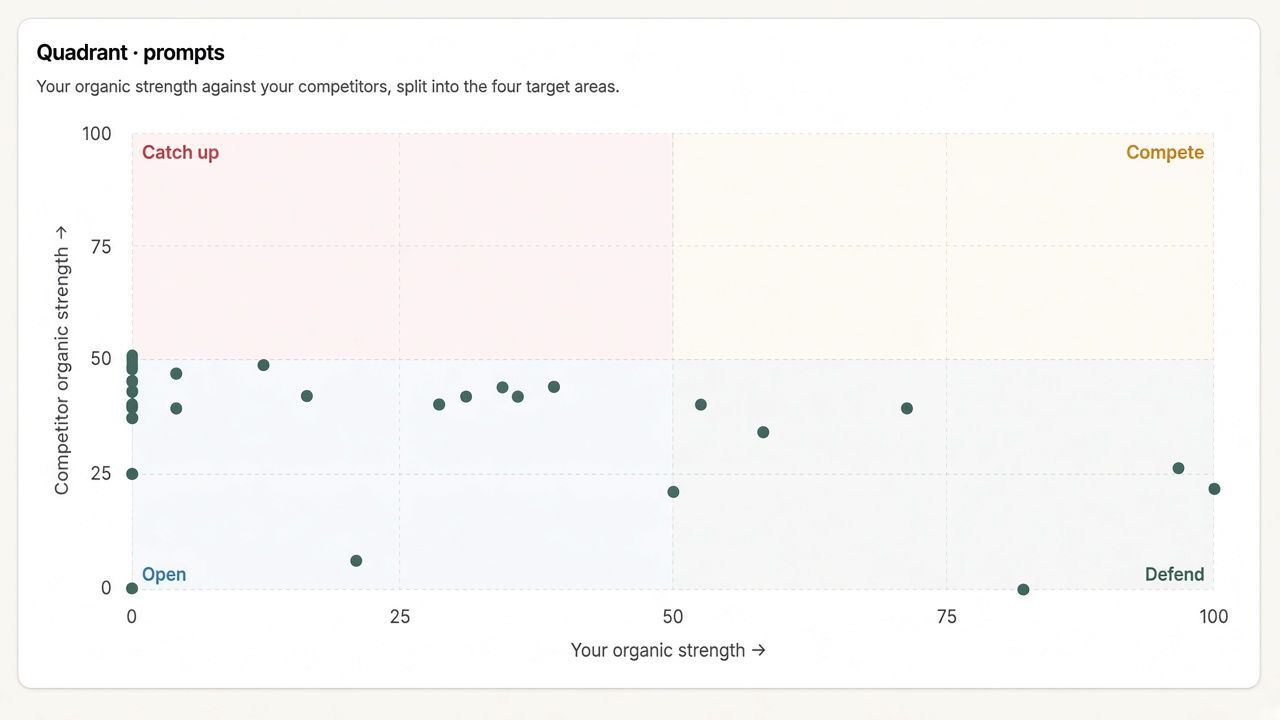
Turn your organic footprint into a OpenAI campaign brief. Filter prompts by competitor, category, country, and tag, then see how they split across four situations:
Catch up: Competitors show up but you don’t. Usually the highest-impact place to spend.
Defend: You already own the answer. Advertise to keep it.
Compete: You and your competitors both show up. High impact, win the answer over your competitors.
Open: Nobody is strong yet. Cheapest ground to claim first.
Click charts to pick the prompts you want, then generate proposals. Kime drafts campaigns, ad groups, and copy from that slice. A first-visit tour and hover definitions cover the vocabulary.
Find it in the sidebar as Campaign builder, or from Ads Manager via Create campaign → Propose with Kime.
Ads Manager
One place for live OpenAI Ads, KIME proposals and performance overview.
Proposed: Drafts from Campaign Builder. Review budget, targeting, and creative, then accept. Reject anything you do not want.
Actual: Create and manage live campaigns yourself, including budget, bidding, locations, contextual hints, and ChatGPT chat-card ads (headline, body, image).
Results: Spend, impressions, CPC, CTR, CPM, and conversions - get all the insights to see if your campaign performs or if it needs tweaking.
Connect an OpenAI Ads API key under Ads Manager → Manage keys. Billing stays in OpenAI. Conversion events are created on OpenAI’s side; you can view them and attach them to campaigns in KIME.
We look forward to hearing what you think about our latest updates!🤩